Built for you, Inspired by you

TimeFiler Payroll - from attendance to being paid

TimeFiler Payroll is designed to give payroll teams confidence and CFOs the visibility they need. 
00 top screenshot

About TimeFiler Payroll

When customers began leaving legacy payroll systems, whether voluntarily or at the insistence of their vendors, they asked us who we could recommend. Finding no solution we could wholeheartedly endorse, we decided to build one ourselves, designed around the needs of the customers who have trusted TimeFiler for Time and Attendance for up to 20 years. It’s something we’ve always had in mind - TimeFiler was built from the outset to support adding payroll.

Features

Why TimeFiler Payroll is the solution for medium to large enterprises 

Audit trail icon

Full audit trail, always

Every calculation is visible and traceable, including exactly how leave rates have been calculated. Built-in warnings flag potential issues before they become problems, giving your payroll team and your business, an extra layer of protection. Need to answer a labour inspector, your CFO, or your own payroll team? Everything's there. No black boxes, no surprises.

Legislative icon

Strict legislative compliance

From leave entitlements and rates to income tax, ACC Earners' levy, protected net earnings, Student Loan, and KiwiSaver, TimeFiler Payroll handles the full picture. When legislation changes, we configure updates ahead of time so your team can see exactly how they will affect payroll before they take effect.
Time and attendance icon

Grounded in Time & Attendance expertise

We've been running Time and Attendance for Kiwi employers for over 20 years. Payroll is the natural next step, and the integration is seamless. Your timesheet data flows straight into payroll the moment a pay period opens.
Adaptable icon

Built to be adapted to work the way you do

No two employers are the same. TimeFiler Payroll is configured to your requirements and adjusts as legislation changes - without costly consultants or lengthy rollout time.
How TimeFiler Payroll works

From timesheet to bank - all in one place

Picture2-1

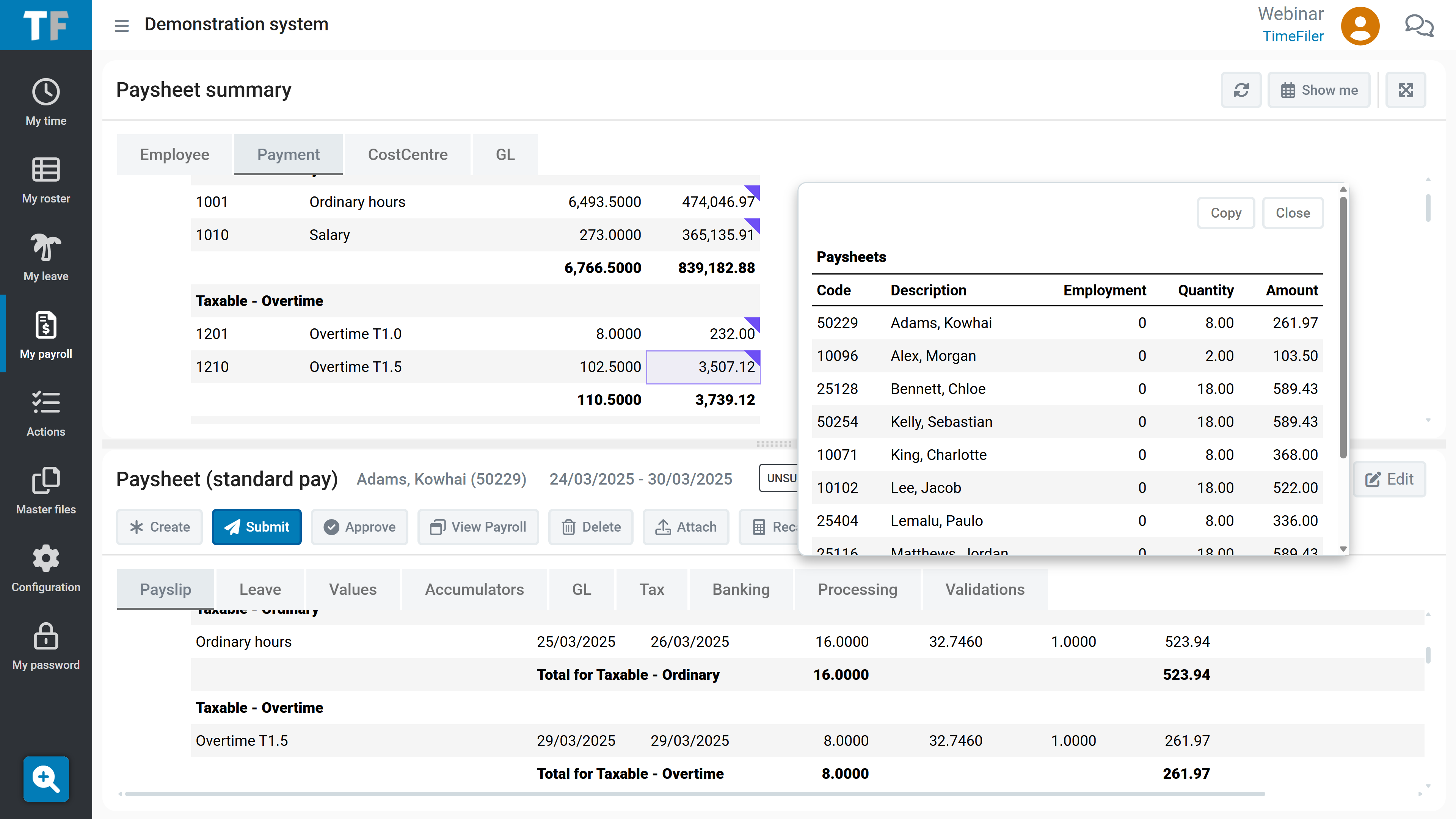
All the information you need in one place

The Paysheet summary is where payroll happens. This is where TimeFiler tells you what to look out for, lets you drill into payments, and shows exactly how everything is being calculated.
Picture3-1

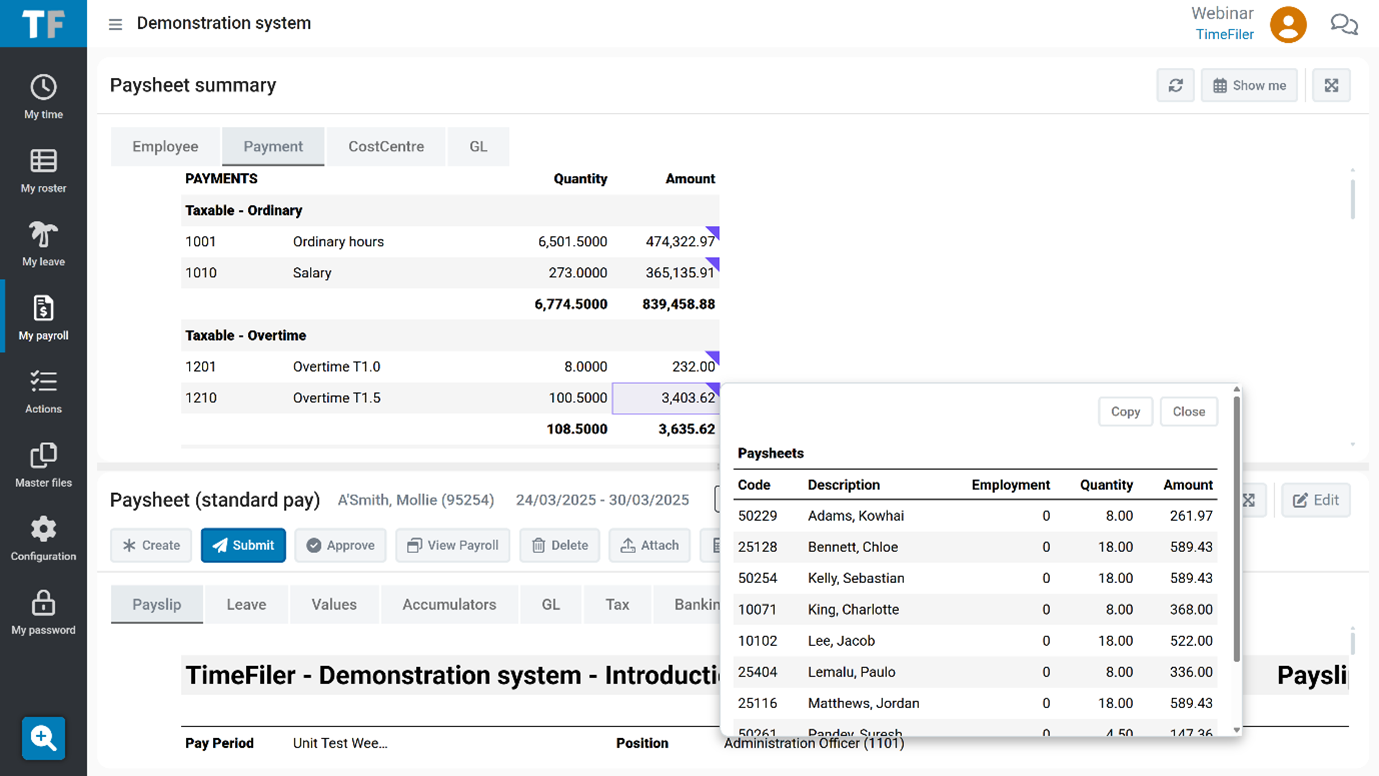
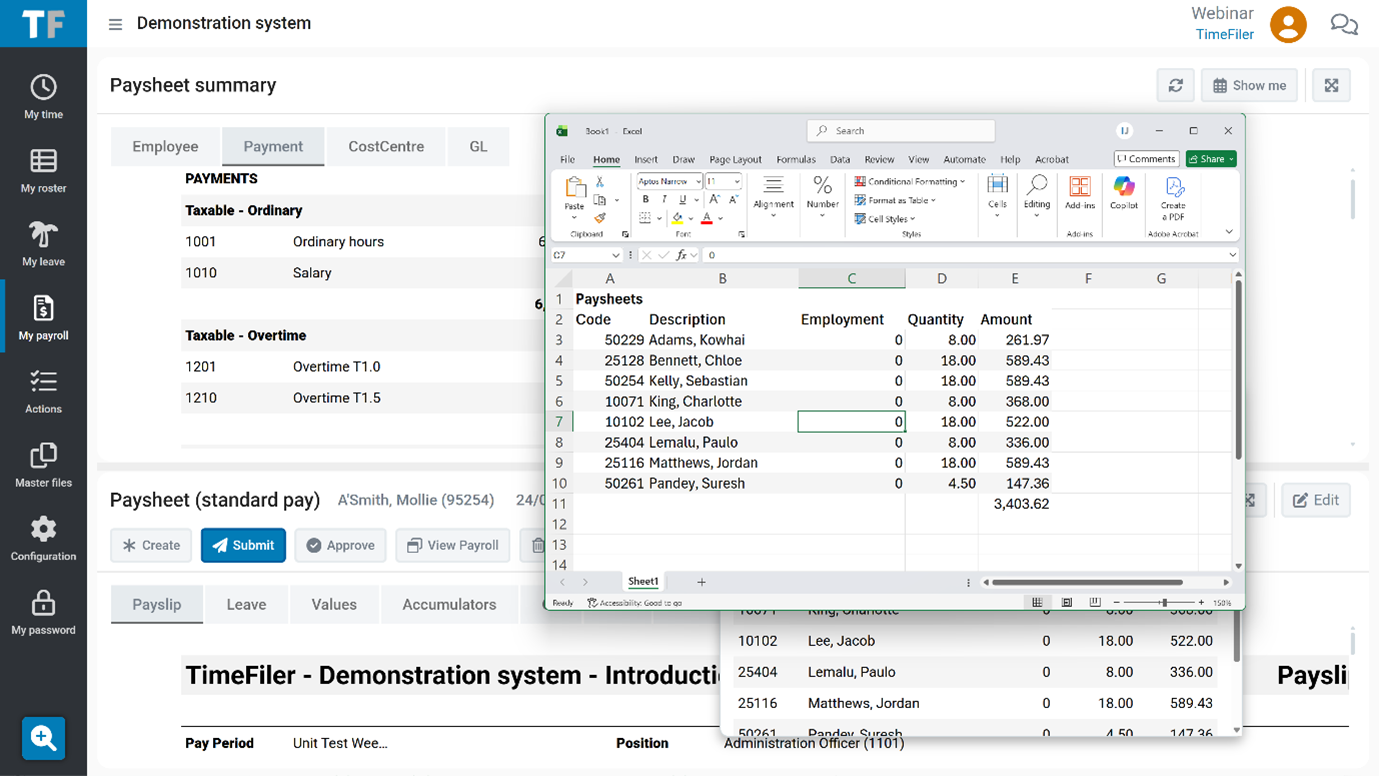
Transfer from screen to spreadsheet

TimeFiler Payroll makes it easy for you to copy what you see on screen straight into a spreadsheet. 

Paysheet leave (1)-1

TimeFiler Payroll is highly configurable

It’s built in a way that allows us to easily add or make changes based on your feedback about what you’d like to see in your payroll. 

Like this example of an employee’s paysheet, showing a summary of Leave for the pay.
11 timesheet summary

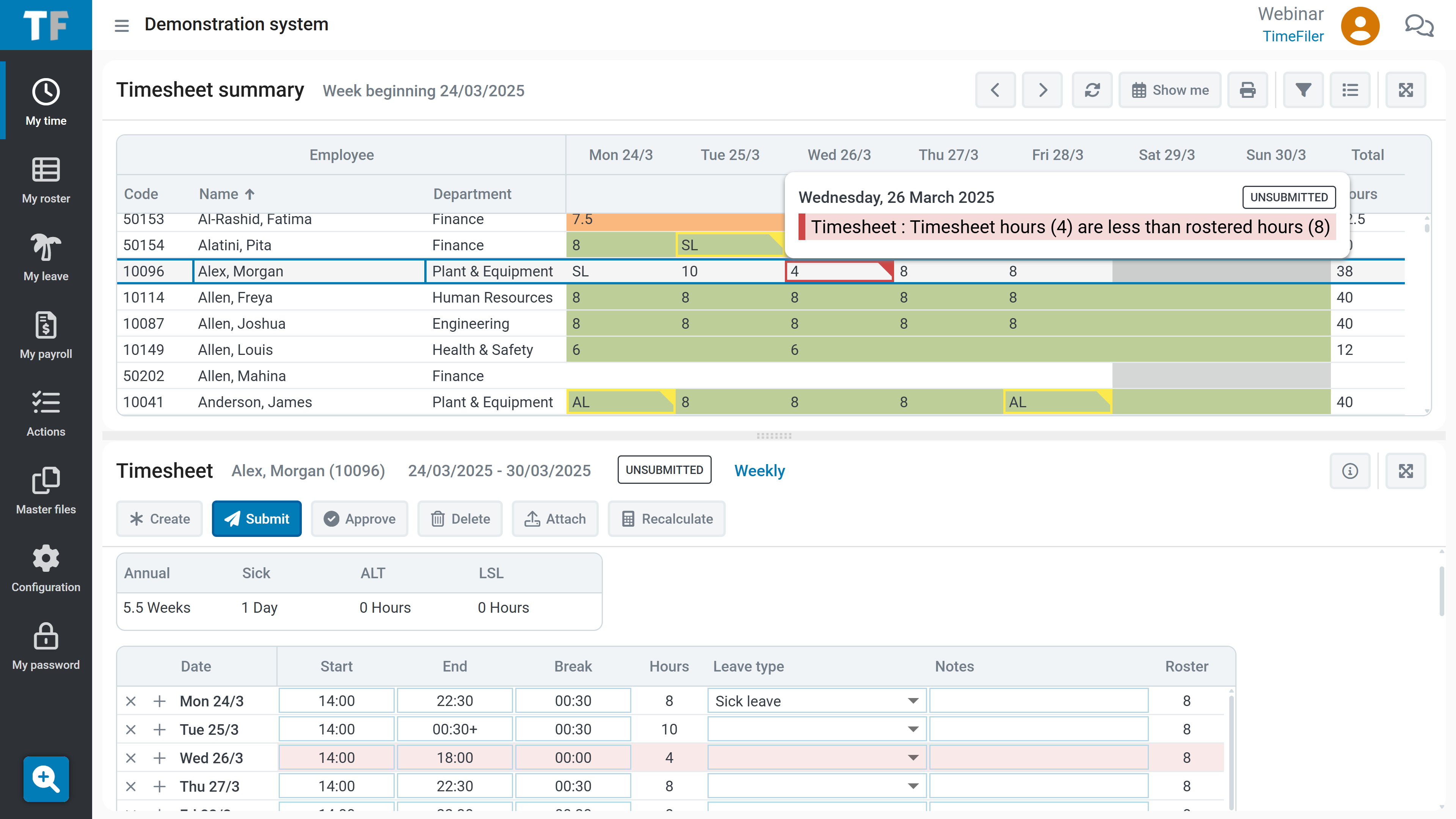
Paysheets generated from time & attendance

Paysheets are built directly from approved timesheets, with hours, leave rates, allowances, and overtime calculated automatically and fully visible.

In this example, the TimeFiler timesheet highlights that an employee finished early.
Picture4

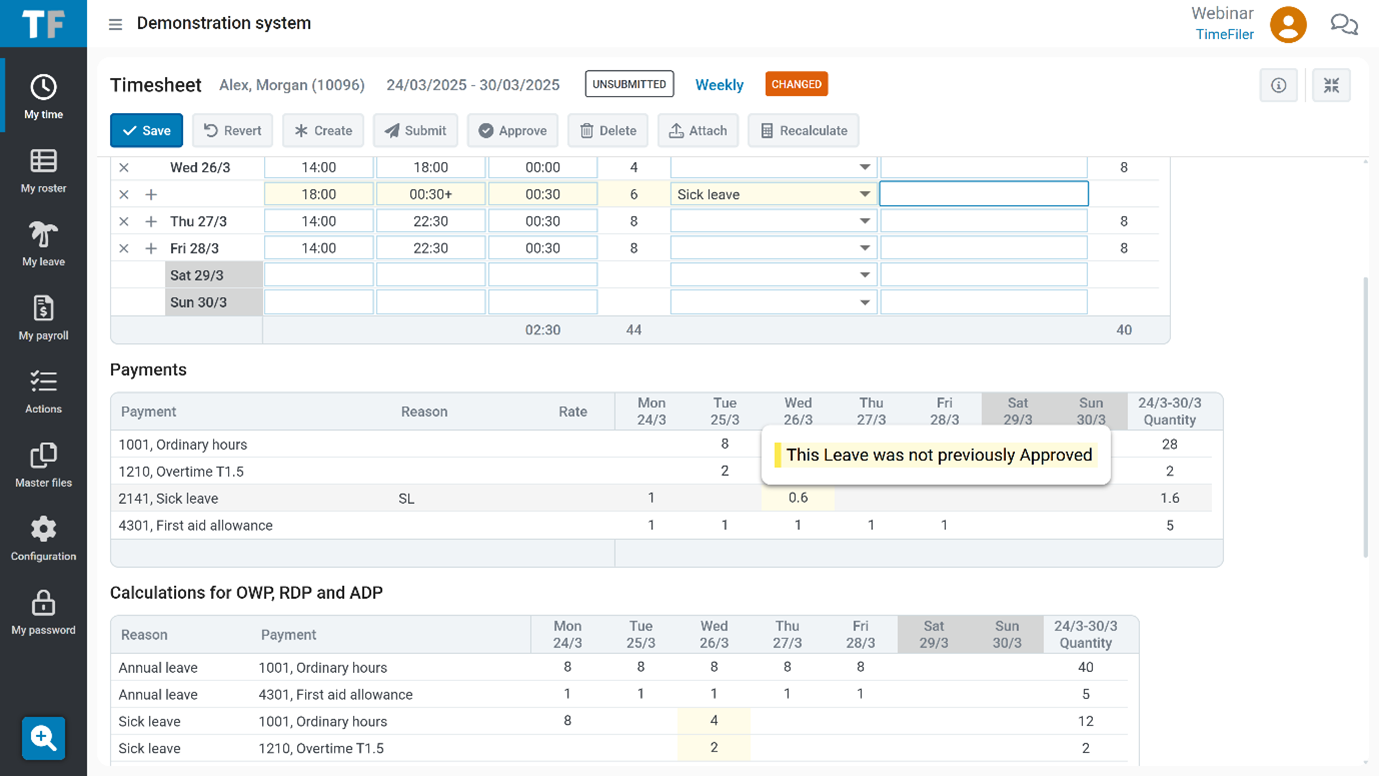
From sick leave to RDP automatically

When a manager records sick leave, TimeFiler Payroll calculates relevant daily pay - the payments the employee would have earned while on FBAPS leave. Payments like overtime or allowances can form part of RDP.

This example shows some overtime being applied.
Picture6

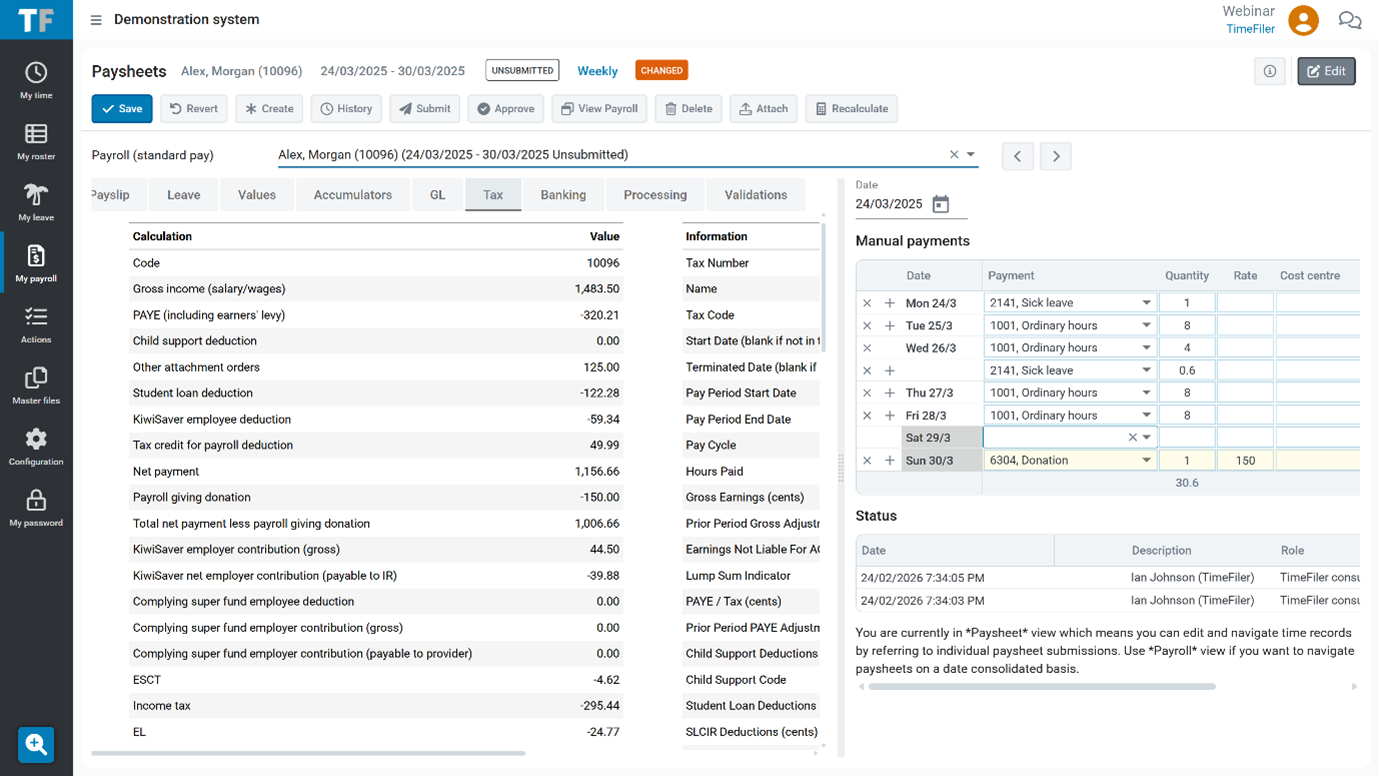
Add one-off payments with ease

TimeFiler Payroll paysheets let you add one-off payments that aren't tied to timesheet events - things like back pay, manual adjustments, or voluntary deductions. If its a regular payment, you can set up an automatic transaction - if it’s one-off, you can enter it on the paysheet. TimeFiler automatically calculates the tax impact in real time - so that it’s easy to show exactly how this is being applied.
Configured to the individual, accurate to the date


Per-employee settings, date-effective changes. Company-wide defaults can be overridden at the employee level; for example, whether annual leave is calculated using a 4-week average, which rate applies to FBAPS leave, or whether unpaid leave triggers an extension to the annual leave entitlement date. And when things change mid-period, a rate update, a new leave entitlement, a parental leave return - the change takes effect on the date it applies. The system doesn't wait for the next pay cycle to open, process, or close. If an employee becomes entitled to sick leave on a Wednesday, Wednesday is when they can use it.

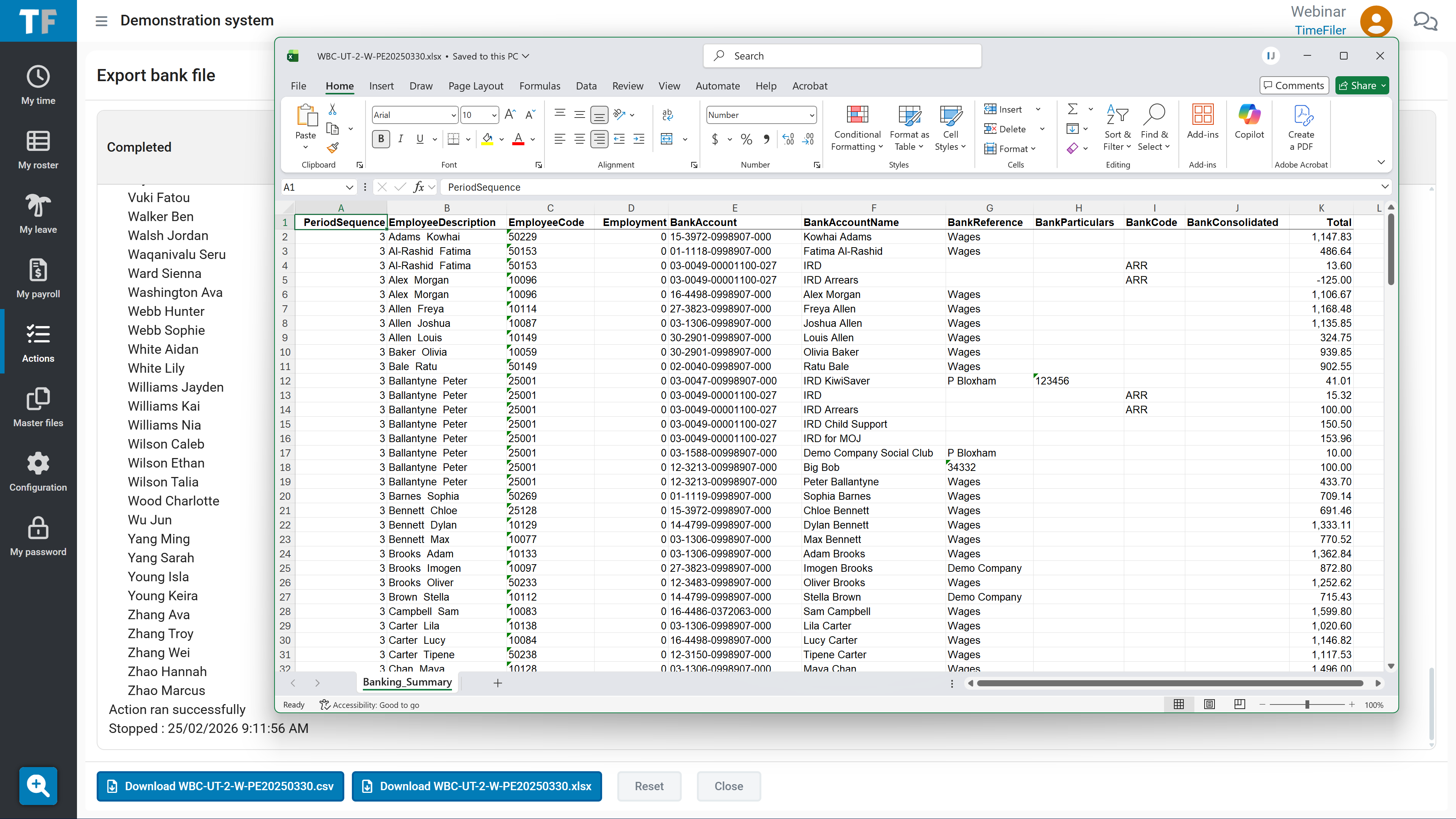
31 bank export

Direct credit and Payday filing, straight from the system.

Generate your direct credit file and Payday filing submission straight from the system. Every output also comes with a spreadsheet showing exactly what went to the bank and IRD.

Ready to see how TimeFiler Payroll will work for you?

Untitled design (75)

TimeFiler Payroll features and functionality 

Secure, resilient, and yours.

Securely hosted in New Zealand and Australia

Your employees' payroll data doesn't leave New Zealand and Australia. Full stop. 

Single Sign-On Access

Full SSO support, as already used by many TimeFiler customers today.

Annual third-party security testing

Regularly tested and updated. Our model means we push security updates without disruption to your team.

No AI interfering with your data

No AI behind the scenes. TimeFiler does not use AI to calculate pay, and does not upload your employee data to any AI service. What you do with your own data is your choice - but we will never make that choice for you.

Modern API-first architecture

TimeFiler Payroll seamlessly syncs with IRD, generates the bank files you need for payroll payments and integrates with HR, Finance, and BI tools using seamless, secure, API connectivity. If that isn’t possible - we'll find a way to make your tech stack work. 

Export anything, anytime

TimeFiler makes extracting data simple through automated integration for reporting and syncing with other systems, or simply right-click to drop data straight into a spreadsheet - be it a table or an entire pay spread across tabs. Your data is always within reach. 

For your whole team

What each person gets out of TimeFiler Payroll

Payroll Manager

Payroll Leaders

  • Paysheets generated from Time and Attendance - no re-keying
  • Short-notice changes handled without starting over
  • Full calculation detail visible on screen
  • Date-effective values handle complexity automatically
  • System highlights what to check - helps you get it right

Financial manager

Finance Leaders

  • Period summary at a glance
  • Full audit trail for every calculation, every period
  • IRD filing and direct credit output in one place
  • Confidence the system enables the company to comply
  • Reporting via API or direct Excel export

HR Manager

HR Leaders

  • Per employee settings for complex organisations
  • Merge new entities with different settings from day one
  • Leave entitlements and Holidays Act - built to enable compliance
  • Employment law changes configured early - test before go-live
  • API integration with your existing HR systems

Frequently asked questions

How does migration from our existing payroll work?

We sync the data from your existing payroll into TimeFiler, extending the sync that most TimeFiler customers already use for time and attendance. The goal is that you log in and see your payroll data already there, minimising the validation burden on your team.

What happens when legislation changes - like the new Employment Leave Bill?

We configure legislative changes well in advance of their effective date, so your payroll team can see exactly how leave will be processed under the new rules months before they kick in, no surprises on day one. When the Employment Leave bill is passed, we'll have it configured in TimeFiler well ahead of time, so you can see precisely how it will apply from the effective date.

Does TimeFiler Payroll use AI?

TimeFiler does not use AI to run or generate pay, and we do not upload your employee data to any AI service. Security and accuracy of your employees' data is non-negotiable. Our job is to give you clean, structured data so you can use your own tools, including AI tools to analyse it.

Can it integrate with our HR system?

Yes, using all the automated tools TimeFiler has honed over the years to integrate with a host of 3rd party applications. We have extensive experience integrating with third-party systems and this is well within scope for discussion.

When will it be available?

We're onboarding our first customers this year. If you'd like to be among them, the best step is to book a demo and have a conversation with our team.

Want to know more? Let’s set up a call